Admin panel, roles and permissions
Hi Trially users!
We're excited to introduce our new Admin Panel, designed to give you better control over user management and site access. Here's what's new:
New Role-Based Access System
We've introduced three user roles to help you manage your team more effectively:
Admin Role
Full system access across all sites
Can manage all users, protocols, and site settings
Exclusive ability to edit protocol details and delete protocols
Can assign users to any site
Can set filters for protocols at all sites
Site Admin Role
Site-specific management capabilities
Can invite and manage Viewers for their assigned sites
Can upload protocols and manage protocol for sites they have access to
Cannot edit core protocol details or delete protocols
Can set filters for protocols at their assigned sites for Viewers
Viewer Role
Read-only access to assigned sites
Can view protocols, team members, and patient matching
No editing capabilities
Cannot set filters on/off
Team Management
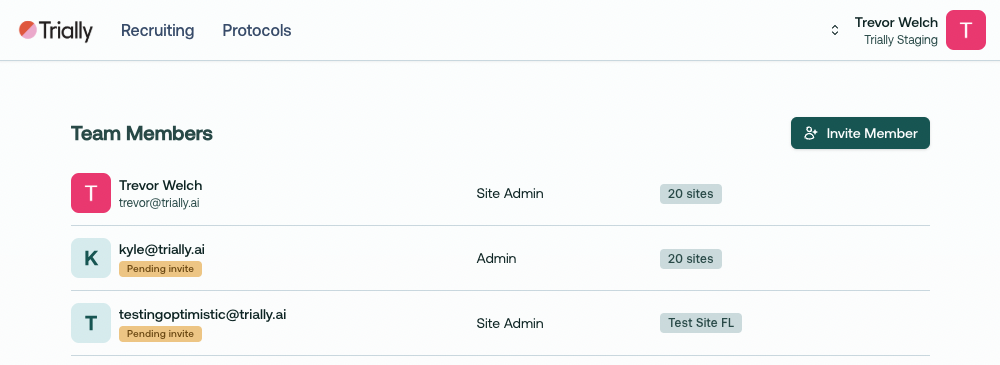
Access the new Team page through your profile dropdown menu
Easily invite new team members by email
Assign multiple sites to any user
Manage existing users:
Edit their roles and site access
Remove users when needed
Re-invite users who haven't accepted their invitations
Protocol Management
Admins: Full control over all protocols across sites
Site Admins: Upload and manage protocols for their assigned sites
Enhanced site assignment system for protocols
CSV export functionality for Admins and Site Admins
Site Access Controls
Granular control over which sites users can access
Mix-and-match site assignments for flexible team management
Clear visibility of user permissions and assigned sites
Getting Started
Log in with your Admin credentials
Visit the Team page through your profile dropdown
Start inviting team members and assigning roles
Manage site access based on your team's needs
Thanks for using Trially! As always, we welcome your feedback and suggestions.
~ Trevor @ Trially